
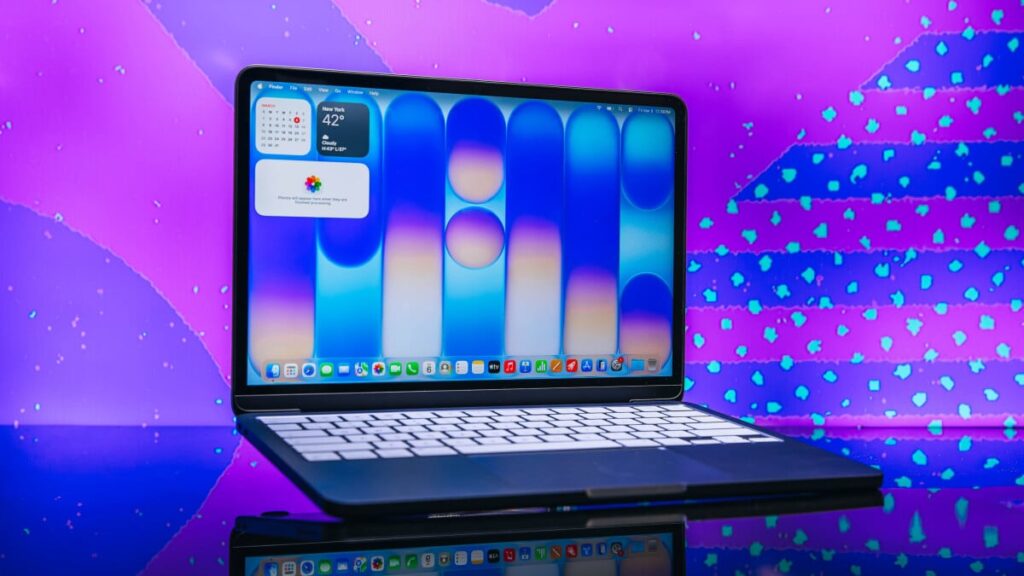
MacBook Neo review: This laptop is even better 3 months later
Table of Contents
On March 11, Apple dropped the MacBook Neo like a bomb on the laptop market. I was at a New York City launch event to see its big unveiling, and the colorful budget laptop made a strong first impression. As I wrote at the time: If I were a Windows laptop that cost under $1,000, I’d be shaking in my boots.
Well, after spending an extra three months with this laptop on my desk, I’m updating my initial review. After months of RAMageddon price increases in the Windows world, the MacBook Neo is doubly impressive.
The Neo brings premium MacBook features — Liquid Retina Display, the intuitive macOS, a sleek aluminum design — to an entirely new market segment: the budget laptop.
The laptop starts at $599 — a version with Touch ID and 512GB costs $699 — and if you qualify for the $499 education price, this is truly a laptop with no viable competition, full stop.
Who is the MacBook Neo for?

The MacBook Neo in citrus and indigo at the Mashable office.
Credit: Joe Maldonado / Mashable
The MacBook Neo is Apple’s first MacBook without an M-series chip since 2020. For that reason, the Neo is not a laptop for professionals like myself. If you need to do heavy-duty photo or video editing, work with 3D modeling programs, or run open-source AI models on your device, you’ll want that MacBook Air or Pro with the latest M5 chips.

The Neo has an all-aluminum design; Apple matches the color of the keys to the aluminum.
Credit: Joe Maldonado / Mashable
Instead, the MacBook Neo is meant to be baby’s first laptop, and I mean that as a compliment. It’s a starter laptop you might buy for a high school or college student who will eventually graduate to the Air or Pro, depending on their needs. But I also foresee another popular use case for this device — the party laptop.
Lots of people, including myself, use two laptops on a daily basis. You have your work laptop — in my case, a MacBook Pro — and then you have what I call the party laptop. It could be a simple Chromebook, an old work laptop, a gaming laptop, or even a tablet. When your workday is done, you put away the work laptop with your email and calendar, and fire up your party laptop for streaming, music, casual browsing, and retail therapy.
The MacBook Neo would be a perfect party laptop or Chromebook alternative, and while it lacks storage and RAM, Apple definitely didn’t skimp on the entertainment features.
MacBook Neo design: We gotta talk about the colors

Credit: Timothy Werth / Mashable
No tech brand does design better than Apple, at least, not for the mass market. And in the under-$1,000 laptop category, the Neo stands out for its premium design. Lately, we’ve seen many Windows laptops imitating the MacBook’s metal body and rounded edges, but those are typically Ultrabooks that cost quite a bit. The Neo offers a budget price without compromising on Apple’s signature all-aluminum build quality.
Let’s look at the competition: Our No. 1 budget Windows laptop in 2026 is the Acer Aspire 16 AI, which costs $699. It’s a good laptop, but it also has a flimsy hinge and plastic components. With the Neo, you get an aluminum chassis, plus it’s $100 cheaper, plus it comes in fun colors, plus it has Dolby Atmos speakers.
The MacBook Neo comes in four colors: silver, indigo, citrus, and blush. Now, I will say, the blush is a very subtle pink. I say, if you’re going pink, go pink. But in person, the citrus and indigo really pop. Apple also color-matches the keys to the aluminum finish, and it’s those little details that elevate the design. The Apple team has been having a lot of fun with this product launch, and I think shoppers will, too.
MacBook Neo: Performance and battery

Be honest, did you notice the home screen artwork says “MAC”?
Credit: Joe Maldonado / Mashable
When Apple unveiled the Neo, two competing opinions spread in the tech world. The MacBook Neo, with its fun colors and killer price, would either disrupt the entire Windows laptop market, or it would be an underpowered waste of space with its old iPhone chip and a measly 8GB of RAM.
In this case, the optimists were proven right.
To be sure, you’re not going to edit a professional music video, mix a song, or work on an animation project with 8GB of RAM and the A18 Pro chip, first introduced for the iPhone 16 Pro. But don’t believe what the haters are saying online: You can still do a lot with 8GB of RAM.
Here’s what people are forgetting: Over the past few years, Apple has quietly made its MacBook Air and Pro laptops way overpowered for the average user. (The same is true for the iPad Air and Pro, as I explain in my M4 iPad Air review.) The original M1 MacBook was a legendary laptop that truly changed the category for good. Six years later, I know professional film editors who are still working on M1-era MacBook Pros and have zero complaints about performance or speed.

Apple M-series silicon changed the laptop market for good.
Credit: Mashable
As you can see in this chart, ever since Apple launched the M1 chip in 2020, the company’s M-series silicon has progressed by leaps and bounds. At one point, it seemed like Qualcomm’s Snapdragon X Elite chip might finally offer some true competition for Apple silicon, but then Apple released a new M chip.
Apple’s M series chips have made such massive leaps in performance that you have to be a serious superuser to tax these devices to their limits. So, a simpler MacBook with less firepower makes sense for a ton of reasons. You don’t need 16GB of RAM and an M5 chip to stream Netflix, make Word documents, and send emails.
But let’s get specific. Let’s talk benchmarks.
MacBook Neo review: Geekbench performance and stress tests

Credit: Joe Maldonado / Mashable
When testing a new laptop, Mashable runs a series of standardized tests, including the latest Geekbench 6 benchmark. The MacBook Neo received a multi-core score of 8,770, nearly identical to the 8,783 we recorded for the M1 MacBook Air. We also assessed its single-core performance, since that’s a good measure of what we call snappiness, or how quickly it responds in everyday use. And this is where it gets interesting. The MacBook Neo achieved a single-core score of 3,484, significantly higher than most other laptops.
For reference, the Razer Blade 18 with an Intel Core i9-275HX processor scored 3,057 in single-core testing. So, it’s no wonder I’ve been able to do a surprising amount with the A18 Pro Chip.
I was able to edit a simple, cheesy video in Final Cut Pro using the MacBook Neo without struggling against the spinning wheel of death. Even when I layered video clips on top of each other and added a series of totally unnecessary transitions, the Neo handled the tasks just fine, as you can see for yourself:
For my MacBook Neo review, I also set up multiple Apple Shortcuts to perform complex tasks. I set up one Shortcut to automatically convert raw image files into JPEGs, crop them into a 16:9 aspect ratio, auto-adjust the color balance, hue, and saturation, and then save them in a specific folder. Using this Shortcut, the Neo edited a dozen massive image files with ease in under 30 seconds.
I set up another Shortcut to automatically convert all my video files into GIFs, also without problems.
The MacBook Neo does have one big flaw

The lack of Thunderbolt 4 ports is a big drawback.
Credit: Joe Maldonado / Mashable
In stress-testing the Neo, I found its kryptonite, which won’t be a surprise. Because the Neo lacks a Thunderbolt 4 port, it can only offer transfer speeds of up to 10Gb/s, compared to 40Gb/s with the latest MacBook Air. Likewise, the A18 Pro chip offers 60GB/s memory bandwidth, compared to 153GB/s memory bandwidth on the M5 Air.
The A18 Pro chip offers:
The only time I encountered the spinning wheel of death? When importing or exporting large files. M-series MacBooks can multitask while doing this, but as you can see in my screen recording, the Neo really struggled to multitask while transferring large video files.
MacBook Neo battery life
Apple promises “all-day” battery life with the Neo. Specifically, the company promises up to 16 hours of battery for video streaming (and 11 hours for wireless web browsing). In our battery rundown test, we got exactly 14 hours and 50 minutes of battery performance.
If you want the MacBook Neo to last for an entire day of classes or a long travel day, I think it will be up for the challenge. And once again, it compares very favorably to Windows laptops under $1,000. In Mashable’s testing database, the media battery life for this category is only 10.5 hours. So, once more, the MacBook Neo can do more for less money.
MacBook Neo: Display and speakers

The headphones jack and side-firing speakers.
Credit: Joe Maldonado / Mashable
The MacBook Neo has the same Liquid Retina display tech that you’ll find on the $1,099 M5 MacBook Air and other Apple laptops. (The Neo’s Display is 0.9 inches smaller than the Air, however.) It can offer up to 500 nits of brightness on its 13-inch, 2,408 x 1,506 resolution display. The color, clarity, and sharpness are as impressive as ever, particularly when you compare them to the average Windows laptop in this price range. It’s a premium display in a budget laptop.
The MacBook Neo isn’t simply a MacBook Air with a bunch of performance sacrifices, however. Apple actually improved the speaker system for the Neo (further solidifying it in my mind as the party laptop). Apple added two side-firing speakers, which you might mistake for SD card readers at first. The result is a speaker system that’s surprisingly loud, clear, and compatible with Dolby Atmos.
MacBook Neo: What’s missing?

The MacBook Neo has the MacBook’s signature all-aluminum design.
Credit: Joe Maldonado / Mashable
The MacBook Neo does make both performance and hardware sacrifices to keep its price low, of course. Before buying the Neo, you need to understand what you’re not getting:
-
No 12MP Center Stage Camera (the Neo has a 1080p FaceTime HD camera)
-
No True Tone technology
-
No fast-charging capabilities
-
No Thunderbolt 4 ports (it has one USB-C 3 and one USB-C 2 port)
-
Only supports one external display
-
$599 version only has 256GB of memory and no Touch ID (the $699 version has 512GB and Touch ID)
The MacBook Neo has a Magic Keyboard, but it’s not backlit like you’re used to. It also features a different trackpad. While it’s extra-clicky, it’s not quite as nice as a standard MacBook. That’s hardly a breaking point, though.
Will Siri AI work with the MacBook Neo?
At WWDC 2026, Apple finally introduced Siri AI, which will be coming with macOS 27 Golden Gate. Even though the Neo lacks M-series silicon, Apple says it will be ready to support the new OS, the updated Siri, and new Apple Intelligence features.
For now, these features are only accessible on the Neo via the macOS 27 developer beta, but they will be widely available starting in the fall.
Final thoughts: Is the MacBook Neo worth it?

Credit: Joe Maldonado / Mashable
My verdict: The MacBook Neo is 100 percent worth it for budget shoppers. Unless you need a Windows laptop, it will be hard to find a Windows PC under $1,000 than can go head-to-head with the Neo.
I will continue to update this review for as long as I’m using the Neo. But as someone who works with a lot of video, photography, and AI tools, the MacBook Neo can handle quite a bit of my daily workflow. First-time buyers will also appreciate how easily it works with the iPhone and iPad. As per usual, your files can instantly sync across devices, and AirDrop fills any gaps.
As I said, if you’re comparing the $599 MacBook Neo with a similarly priced Windows laptop or Chromebook, it’s going to be really hard to say no to the Neo, especially as Dell, Microsoft, Lenovo, and Acer raise prices. And if you qualify for the $499 education pricing (unfortunately, Apple has cracked down on the requirements), don’t overthink this one.


UPDATE: Mar. 11, 2026, 11:18 a.m. EDT We’ve replaced one of the images in this review to correct a photo-editing mistake.